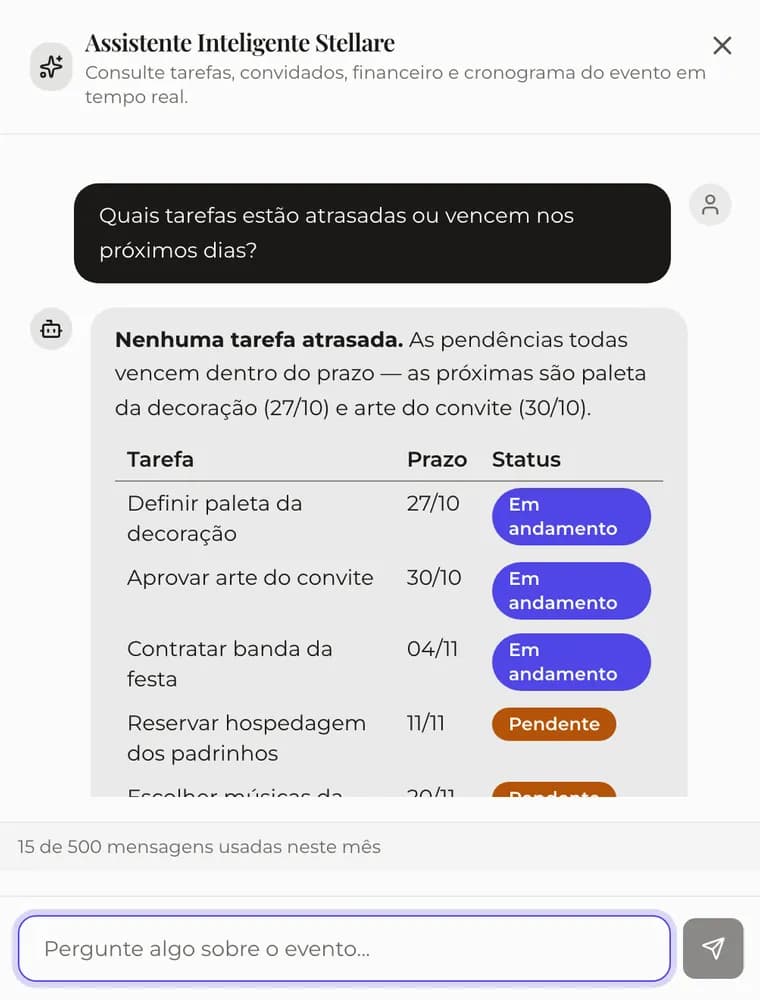
Who has RSVPed, the day's schedule minute by minute and what is left to pay each supplier: your whole team sees it up to date, with no digging through WhatsApp messages.
Payments processed by Stripe · Instant access · Cancel anytime
New, in pilot: an assistant that answers questions about your event. Meet the assistant
Register the wedding you are planning and use it in your team's routine. Cancel anytime.
Your clients' guests, contracts and payments live in a space that is only yours, and only people you invite get in.
You cancel from your own account, without calling anyone, and download each event's finances as a spreadsheet whenever you want.
WhatsApp is still where you talk to clients. What changes is where the information is kept.
Yes. At the office you use it on the computer and, on the event day, on your phone. You can add Stellare to your home screen and open it like an app, with nothing to download from a store.
Yes. Invite your team members and assign tasks with deadlines and owners. The number of people depends on the plan.
Guest check-in at the door keeps working even if the internet drops, and check-ins are sent once the connection is back. The other screens need internet.
No. To use Stellare you subscribe to a plan; your agency is created as soon as the payment is confirmed, and you can cancel anytime.
Yes. No contract and no fees: you cancel from your own account, without having to talk to anyone.
Yes. Import the list from a spreadsheet instead of typing guest by guest.
Yes. Each agency has its own separate space, and only people you invite get in.
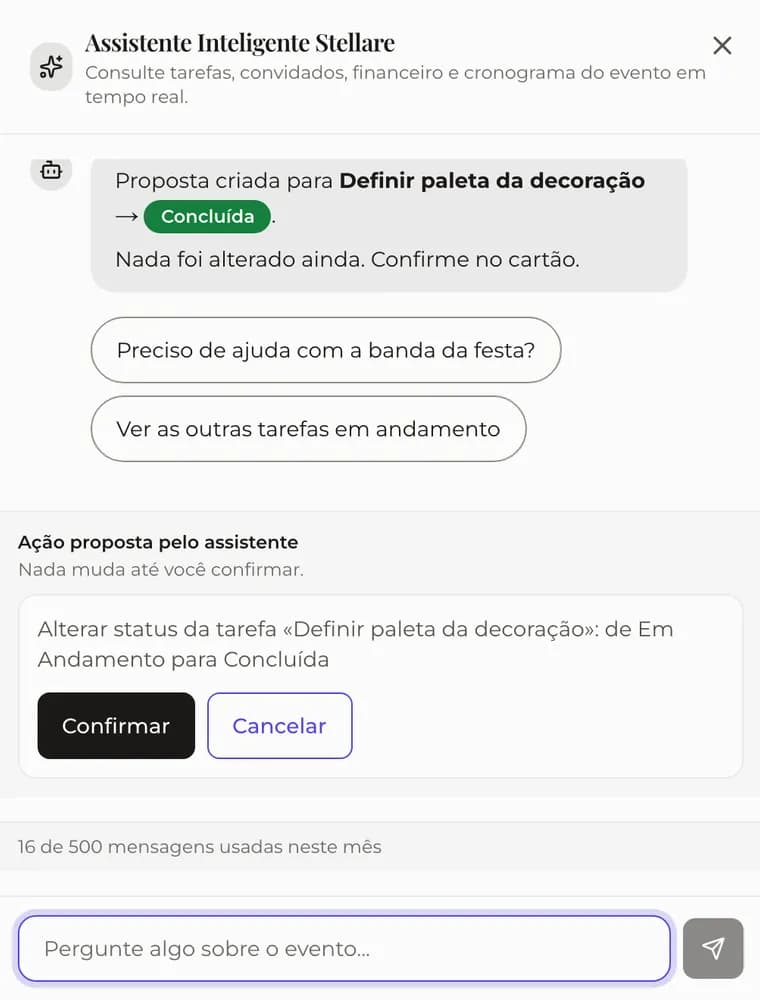
No. It answers about the event and, when it suggests changing a task's status or due date, it shows a card with Confirm and Cancel. Nothing changes until you confirm, and the proposal is valid for 5 minutes.
It is in a closed pilot: access is granted by contact, at suporte@stellare.app. Each plan has a monthly message quota, which you can see on the Pricing page.
If the subscription is canceled or a payment fails, the dashboard is locked for editing and shows you how to get back on track.
Yes. On each event's finance screen there is a button to download it as CSV, a format that opens in any spreadsheet.
Add your next event today and use it with your real routine.
✦ Payments processed by Stripe · cancel anytime
Log every new contact, see where each quote stands and keep the signed contract inside the event.
See clients and proposalsA guest list with RSVPs, tasks shared with your team and every vendor payment with its due date.
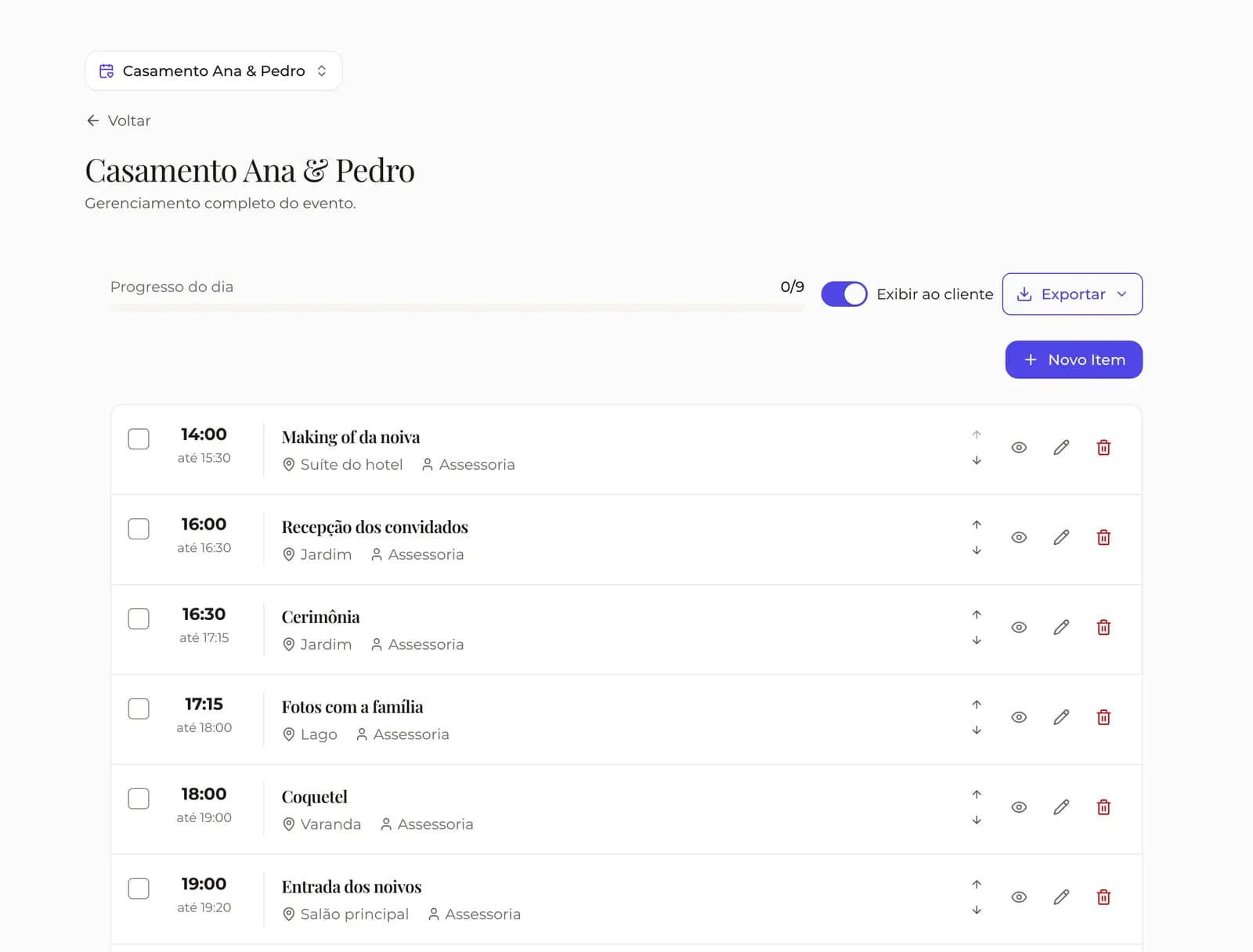
See guests and RSVPsThe team follows the same minute-by-minute timeline on their phones, and the front desk checks guests in even if the internet drops.
See the big-day timeline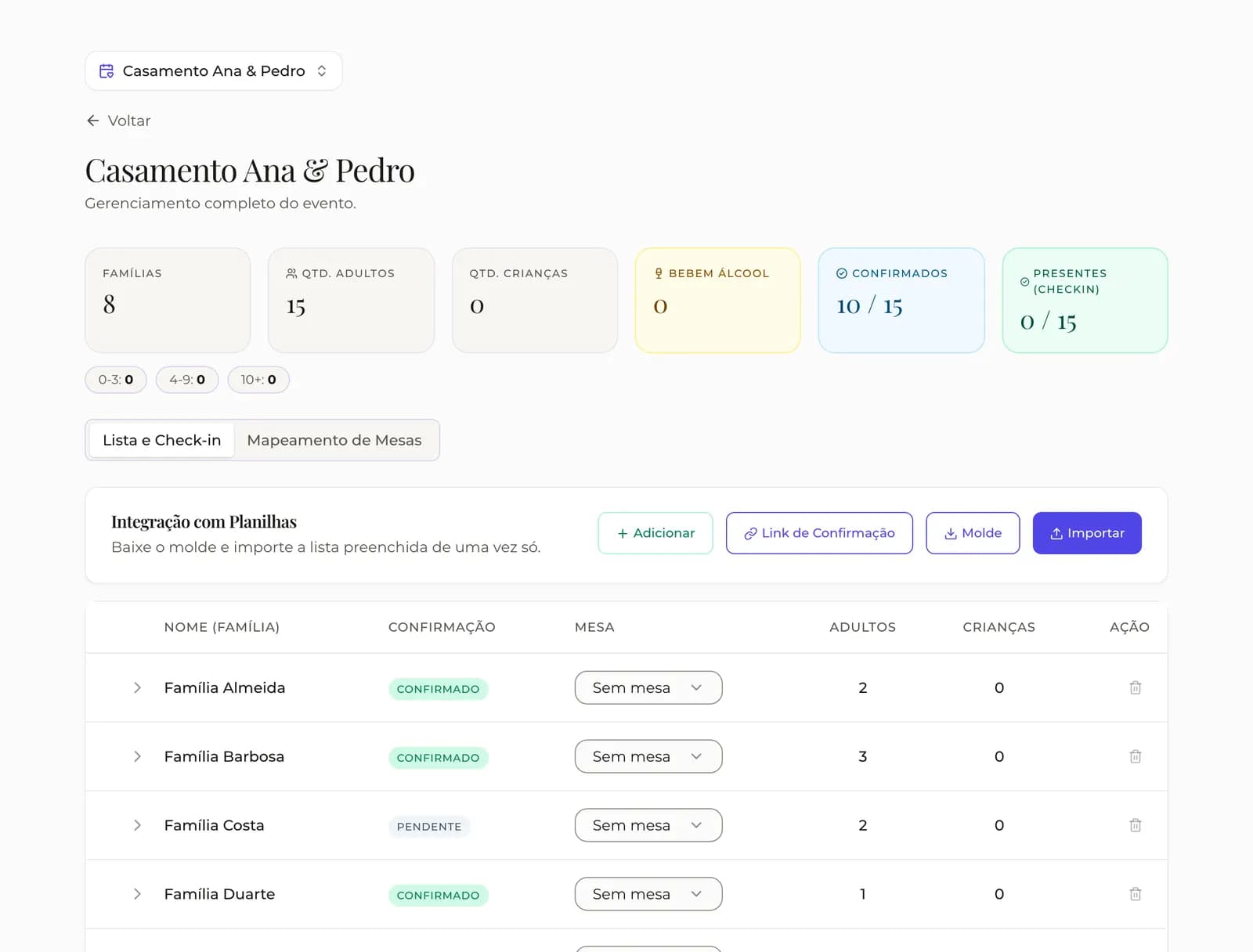
Guests confirm through a link and you know how many adults and children are coming, without asking one by one.
See guests and RSVPsCeremony, the couple's entrance, catering and performances, each with a time and a person in charge. The whole team sees the same version.
See the big-day timelineThe front desk marks who arrived on their phone and keeps working even if the venue's internet drops.
Paid and upcoming installments and the balance owed to each vendor, event by event, without redoing the math in a spreadsheet.
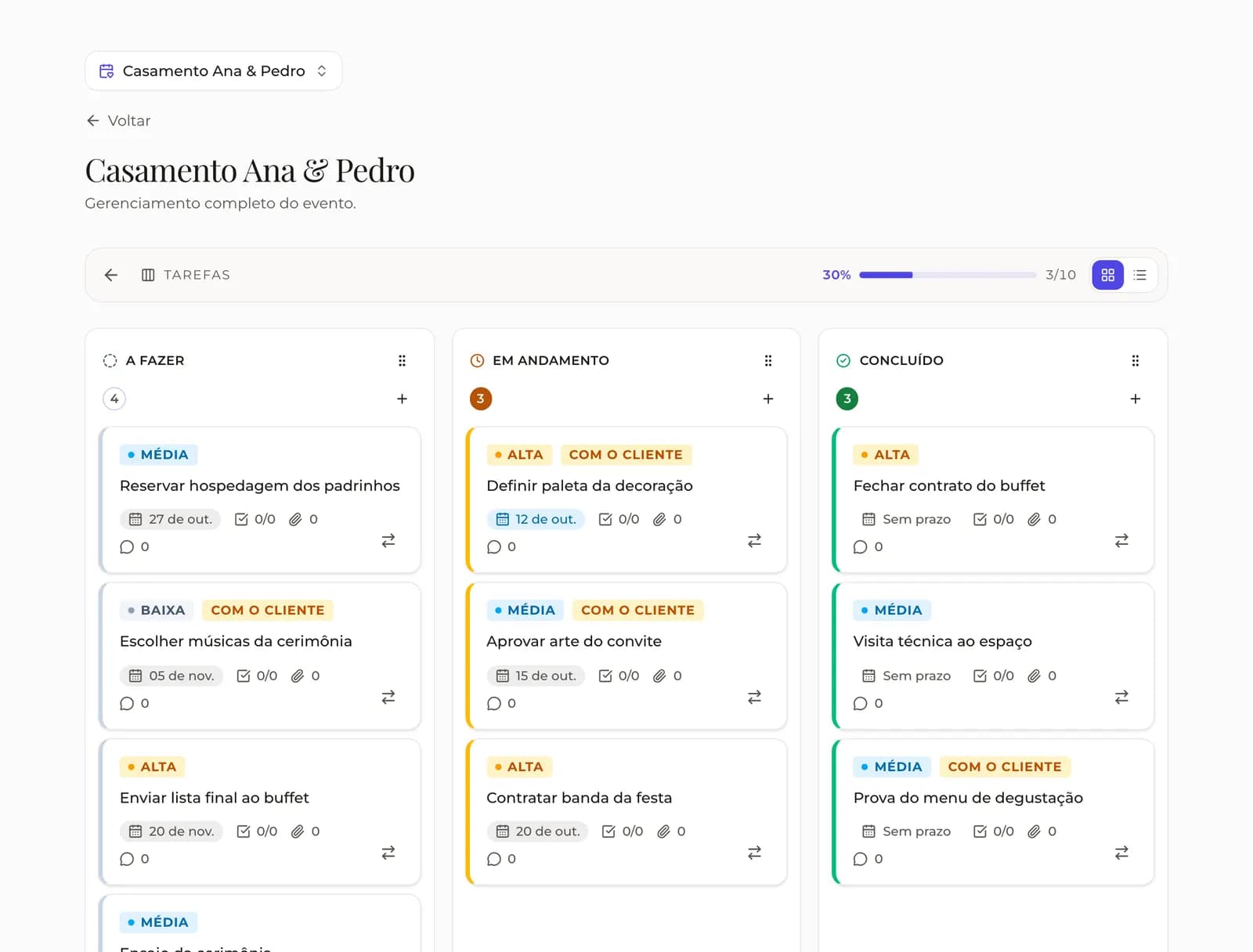
See the finance trackingEvery task with a deadline and an owner. See what's left to do, what's in progress and what's done.
See the team tasksContracts, quotes and receipts kept in the right event, easy to find when someone asks.
An assistant inside the open event. You ask, it answers with what is registered and, when it suggests a change, it waits for your confirmation.
Which ones are late and where each one stands.
How many people and how many families have confirmed, and each guest's status by name.
What was contracted, what is paid, what is left to pay, what is overdue and the next due date.
What happens on the day, at what time, and the event's basic details.
It also proposes changing a task's status or due date. The proposal appears on a card with Confirm and Cancel and is valid for 5 minutes. If the task changed in the meantime, the confirmation is refused and you ask the assistant to propose it again.
It answers about the open event. Wedding or quinceañera tips are general suggestions.
The quota is per calendar month and does not roll over.
Closed pilot: access is granted by contact.
I want to try the assistantEach event gets a private space for the couple or hosts, with email and password sign-in.

Spreadsheet, tables, timeline, briefing and contract check. No sign-up, and what you type never leaves your device.
Ready-to-use .xlsx template for Excel. The guest tab imports straight into Stellare.
How many chairs and tables you need, split by age group. The math stays on your device.
From 12 months out to the big day, with a download for your calendar (.ics).
Answer a few questions and copy a ready-to-send text for photographers, caterers and decorators.
Upload the PDF and see clauses on fees, deposits, cancellation, deadlines, jurisdiction and price adjustments. The file never leaves your device.
Check phones, ages and counts before importing. The file is read in your browser and never uploaded.